Monitoring License Consumption
Our License Manager technology provides sophisticated and easy to use license statistics and monitoring. This page introduces you to that facility and provides alternative techniques for versions of the software that do not contain it.
Monitoring UDA License Usage, Release 6.x and later
Enterprise Edition (Multi-Tier), Release 6.x and later
Our HTTP-based Admin Assistant ships with the Enterprise Edition (Multi-Tier) Request Broker. It provides a License statistics page that displays details of the licenses in use in a given environment.
Use the following instructions to access the Licensing section of the Admin Assistant:
- Open a Web browser.
- Open the *Enterprise Edition (Multi-Tier) Admin Assistant*.
- Expand the Server Components Administration menu.
- Expand the General Request Broker Information menu.
- Click *View Server's License Information*.
- Log in using your Admin Assistant userid and password.
Both fields default to
admin. Note -- this only displays the licenses in active use; it may not include all license files present on the machine.
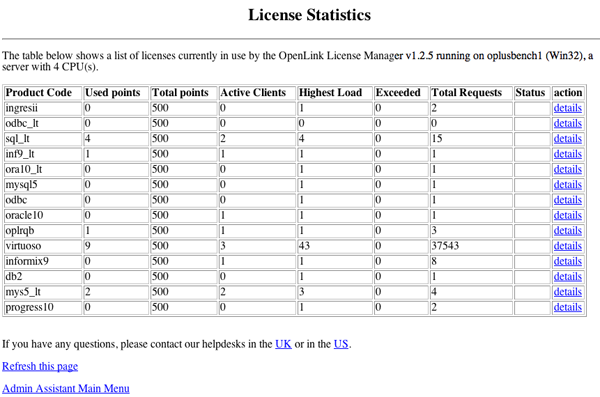
- Click on the details link to obtain additional information about a specific license:
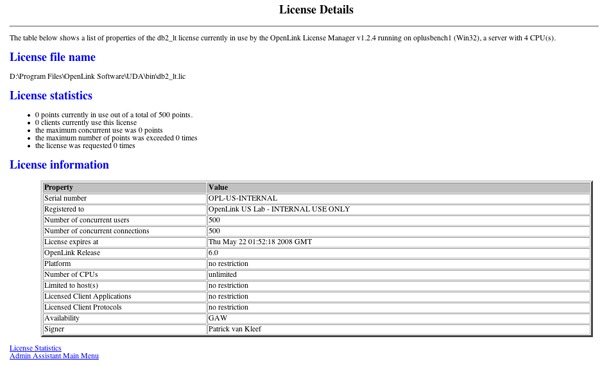
Note -- These pages display the number of logical processors that the License Manager detects on the host machine.
The information shown here should correspond to that revealed by the technique described below for Release 5 and earlier. Please provide screenshots of both, if you see discrepancies.
Lite and Express Edition (Single-Tier), Release 6.x and later
The HTTP-based iODBC Administrator ships with Lite and Express Edition (Single-Tier) drivers for most Unix-like OS (including AIX, HP-UX, Linux, Solaris; not including OS X). It provides a License statistics page that displays details of the licenses in use on a given machine.
- Open a Web browser.
- Open the HTTP-based iODBC Administrator.
- Expand the Client Components Administration menu.
- Click *View OpenLink Client License Information*.
- Login using your Administrator userid and password.
Both fields default to
admin.
Note -- this only covers the licenses in actual use; it does not cover all license files present on the machine.
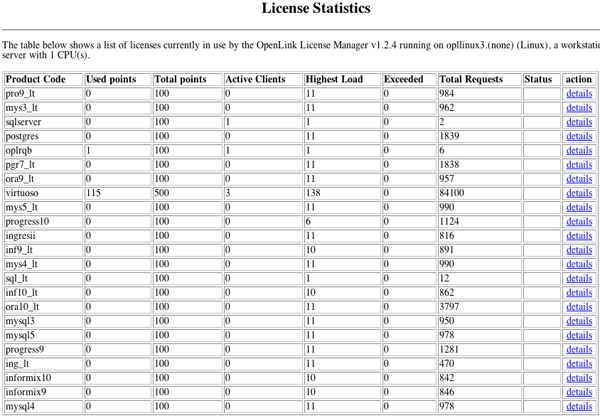
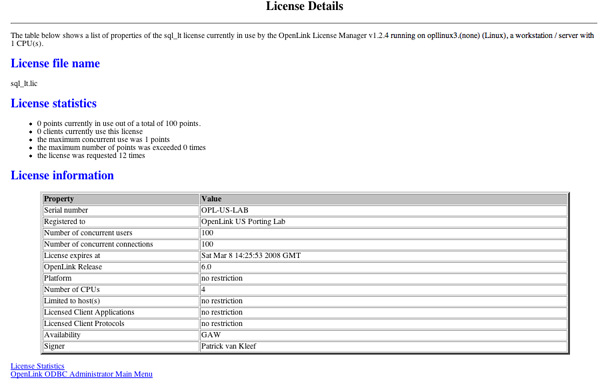
- Click on the details link to obtain additional information about a specific license: Note -- These pages display the number of logical processors the License Manager detects on the host machine.
Monitoring UDA License Usage, Releases 1.x to 5.x
Enterprise Edition (Multi-Tier), Release 1.x to 5.x
Our Enterprise Edition (Multi-Tier) drivers can display basic information about database agent activity from which license usage can be inferred.
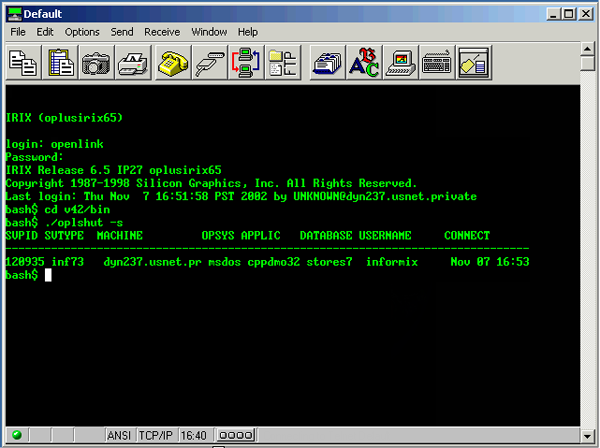
The oplshut utility ships with all Request Broker binaries regardless of operating system.
Either of the following commands will display the currently active client access sessions --
oplshut -s
oplshut +show
Each line item is associated with one database session, i.e., one "concurrent connection." The following illustration shows two PostgreSQL 7 (pgr7) sessions.
License usage can also be monitored through use of a database native session monitor or client-side ODBC tracing. Our support team can provide additional assistance with this, as needed.
Lite and Express Edition (Single-Tier), Release 1.x to 5.x
Lite and Express Edition drivers do not include a license monitoring utility previous to Release 6.x. License usage can be monitored through use of a database native session monitor or client-side ODBC tracing. Our support team can provide additional assistance with this, as needed.
Referenced by...